Leave Your Message

What Are the Best PoE Ethernet Switches from China?

Choosing the best Poe Ethernet Switches from China is not simply a matter of comparing port counts or prices. The right switch must deliver enough power, maintain stable data performance, and fit the installation. Picture a ceiling-mounted Wi-Fi access point, an IP camera outside, and a compact switch in a warm equipment cabinet. Each places different demands on power, cooling, and uplink capacity.

IEEE 802.3bt defines PoE systems capable of supplying up to 90 watts from the power sourcing equipment, with up to 71.3 watts available to the powered device under specified conditions. That difference matters when planning high-power endpoints. Grand View Research estimated the global Power over Ethernet market at about US$1.6 billion in 2023 and projected continued growth through 2030. These figures describe the wider PoE market, not Chinese switch sales, so they should not be treated as a ranking of manufacturers.

A useful expert perspective comes from David Tremblay, an Ethernet Alliance leader involved in PoE industry work: evaluate power capability alongside interoperability and deployment needs. This guide uses that engineering lens to compare Chinese-made switches by PoE standard, available power budget, port configuration, management features, and support. One caution remains: product specifications do not always reveal real-world thermal behavior or long-term service quality. Check the datasheet, confirm device compatibility, and ask suppliers for test evidence before choosing.
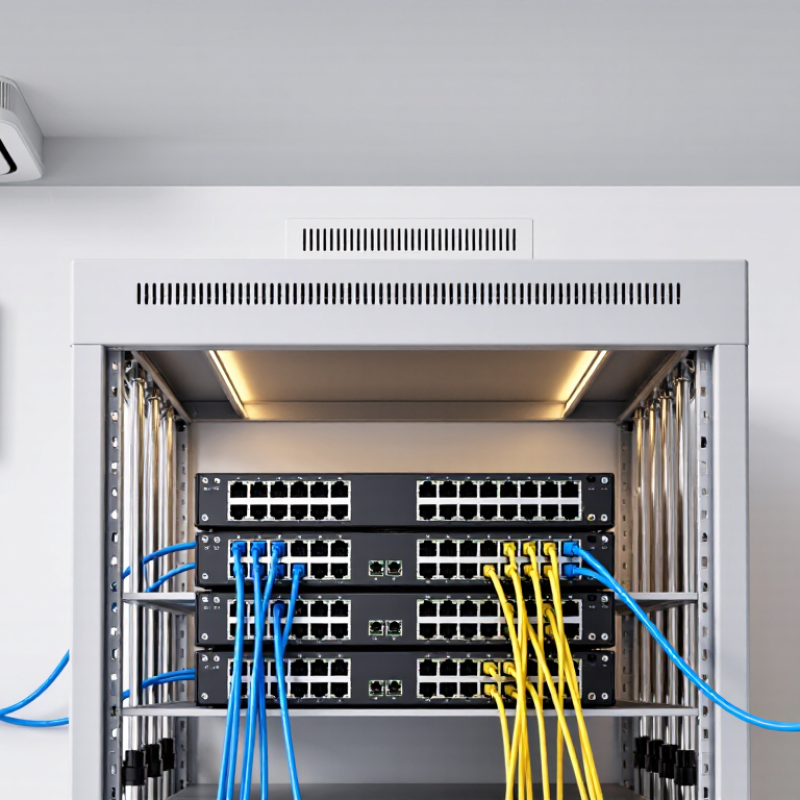
What Are the Best PoE Ethernet Switches from China?

What Is a PoE Ethernet Switch and How Does It Work?

A Power over Ethernet (PoE) switch sends data and electrical power through the same Ethernet cable. One cable can connect a ceiling-mounted access point, an IP camera, or a desk phone without a separate power adapter. The switch supplies power to compatible devices, while its network ports carry data. It detects whether a connected device needs PoE and helps prevent power from reaching incompatible equipment. Neat, but not magic.

Power limits matter. The IEEE 802.3bt standard allows up to 90 watts from the power-sourcing equipment port, with less available to the powered device after cable losses. Check both the switch’s per-port limit and its total power budget before connecting several cameras or access points. Grand View Research estimated the global PoE market at about US$1.5 billion in 2022, with projected growth through 2030. That estimate reflects demand, not a guarantee that every installation needs a PoE switch. Cable quality, distance, heat, and device draw can change real-world performance. I would still verify the actual device specifications; that step is easy to overlook.

What Are the Best PoE Ethernet Switches from China? — What Is a PoE Ethernet Switch and How Does It Work?

A PoE Ethernet switch sends network data and electrical power through the same Ethernet cable to compatible devices. The options below compare common switch classes and selection criteria—not specific products or brands.

Switch Class Typical PoE Standard Maximum Power per Port* Common Port Configuration Suitable Uses What to Check Before Buying
Compact, unmanaged IEEE 802.3af (PoE); some models also support 802.3at (PoE+) 15.4 W (af) or up to 30 W (at) supplied by the switch per port Typically 4–8 PoE ports, often with one or more uplink ports Small offices, a few IP cameras, or basic wireless access points Confirm the total PoE power budget, port count, and whether uplink ports share bandwidth with other ports.
Unmanaged, mid-size IEEE 802.3af and/or 802.3at Up to 30 W per port for 802.3at Typically 8–16 PoE ports Small business networks with multiple cameras, phones, or access points Compare the total power budget with the combined device requirements; per-port maximums do not guarantee full power on every port at once.
Managed PoE+ access switch IEEE 802.3at (PoE+); some models also support 802.3af devices Up to 30 W per port supplied by the switch Often 24 PoE ports with dedicated or shared uplinks Networks needing VLANs, traffic monitoring, remote port control, or centralized device management Check the PoE budget, switching capacity, management features, uplink speed, and support for the required network protocols.
High-power PoE switch IEEE 802.3bt Type 3 or Type 4, depending on the model Up to 60 W (Type 3) or 90 W (Type 4) supplied by the switch per port Port counts and power budgets vary; high-power ports may be limited to a subset Compatible high-power access points, PTZ cameras, signage, or other power-hungry network devices Verify the device’s required PoE type and power, the switch’s per-port limit, and its total budget. Confirm cable and installation requirements.
Industrial PoE switch Varies by model; commonly 802.3af/at, with bt available on some models Depends on the supported standard and model Port count and uplink options vary; some models provide fiber uplinks Factory floors, outdoor cabinets, transport systems, or other demanding environments Check the operating-temperature range, enclosure and mounting style, input-power design, environmental ratings, and total PoE budget.

*IEEE standard maximums refer to power supplied by the switch at the Ethernet port. The maximum power available to a powered device is lower because of cable losses: approximately 12.95 W for 802.3af, 25.5 W for 802.3at, 51 W for 802.3bt Type 3, and 71.3 W for 802.3bt Type 4. Actual switch port counts, budgets, and features vary by model.
Which Features Matter When Choosing a PoE Switch?

When comparing PoE Ethernet switches from China, focus on how well the hardware matches your installation. Check the total PoE power budget, not just the number of ports. A switch with eight PoE ports may still struggle if several cameras need high power at night. Confirm each port’s output and the supported PoE standard. Gigabit uplinks help prevent video traffic from bottlenecking, while VLAN support can separate cameras, access points, and office devices. For a cabinet in a warm room, review the operating temperature and cooling design. Fanless models are quieter, but they still need space for airflow.

Tips: Add the wattage of connected devices, then leave a practical reserve. Read the datasheet and verify the figures with the supplier; product descriptions can be vague. If the switch will power devices over long cable runs, test the planned cable length and load. I once underestimated startup demand from several cameras. The switch worked on paper, but the real installation was less forgiving.

Also consider management features and recovery options. Managed switches can offer port monitoring, VLANs, and alerts when a device disconnects. Unmanaged models are simpler, though troubleshooting may take longer. Check the warranty terms, available technical support, and whether replacement units can be supplied consistently. Specifications matter, but so does the quality of documentation. A small detail can be easy to miss.

What Types of PoE Switches Are Made in China?

Chinese-made PoE Ethernet switches come in several practical types, and categories often overlap. Unmanaged models are simple: connect cameras, access points, or phones, and they begin forwarding data without setup. They suit small offices and basic installations. Plug in and check the link lights. Managed switches add settings for VLANs, traffic priority, and remote monitoring. These controls help separate camera traffic from office computers, but they require someone who understands the network.

Power capacity is another key distinction. Standard PoE models support lower-power devices, while PoE+ and PoE++ versions can supply more power to compatible equipment. Check the switch’s total power budget, not only its per-port rating. A unit may support high output on one port yet lack enough total capacity for every connected camera. This detail is easy to miss.

Physical designs vary too. Compact desktop switches fit beside a router, while rack-mounted models serve wiring cabinets with many connections. Industrial versions often use metal cases and may accept a wider range of operating temperatures for factory or roadside installations. Some include fiber uplink ports for longer connections between network areas. Labels and specifications can differ between suppliers, so confirm port speeds, power limits, cooling needs, and operating conditions before choosing. I would not assume that “industrial” alone means a switch fits every harsh environment.

How Can You Compare Chinese PoE Switch Brands and Models?

What Are the Best PoE Ethernet Switches from China?

How Can You Compare Chinese PoE Switch Brands and Models?

Compare each model against your actual network, not just its port count. Check how many ports support PoE, the standard each port uses, and the total power budget. A 16-port switch may not power 16 cameras at full load. Add the devices’ wattage, then leave a practical margin for startup peaks and future additions. Check uplink speed, too. A fast uplink can prevent several camera streams from crowding a single connection.

Look closely at operating conditions and support details. For a warm equipment cabinet, review the stated temperature range and cooling design. Fanless units can be quieter, but may need more space around their vents. Ask for a clear datasheet, warranty terms, and information about firmware updates. Verify that management features, such as VLANs and port monitoring, match your skill level. Specs can look reassuring. Real deployment is less tidy.

Tips: Request a sample datasheet and test one unit with your intended cameras or access points. Record power draw and link stability under load. Compare the same test across shortlisted models; otherwise, the numbers may mislead. I would also confirm the power budget in writing, because product pages do not always explain shared limits clearly.

How Do You Verify Compatibility, Quality, and Support?

What Are the Best PoE Ethernet Switches from China?

Compatibility starts with the power details, not the product photo.

Check whether the switch supports IEEE 802.3af, IEEE 802.3at, or IEEE 802.3bt. Match the total PoE budget with every camera, access point, and phone. A 24-port switch may not power 24 devices simultaneously.

I once tested a unit that worked well at low load but restarted under full demand. That mistake was costly.

Request the complete datasheet, wiring diagram, firmware notes, and test reports.

Confirm VLAN, QoS, surge protection, operating temperature, and uplink speed.

Then test a sample for at least several days. Use long network cables and connect devices with different power requirements.

Watch for heat, packet loss, fan noise, and unexpected reboots. Small details matter.

Quality also depends on traceability and support.

Ask for serial-number records, production inspection procedures, and a clear warranty process. A reliable supplier should explain replacement times and firmware delivery.

Test technical support before placing a large order. Send specific questions about PoE negotiation and fault recovery.

Vague answers deserve caution.

No test is perfect. I still leave room for revision, because field conditions can expose problems that laboratory checks miss.