What Is the Best Gigabit Ethernet Splitter in 2026?
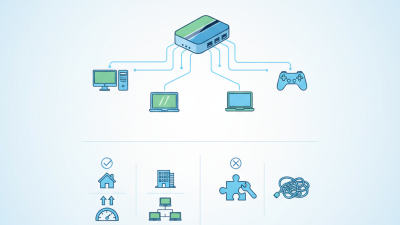
Choosing the best Gigabit Ethernet Splitter in 2026 requires more than comparing port counts and advertised speeds. The term “splitter” is often used loosely. A passive Ethernet splitter usually divides cable pairs for specific setups, while a network switch actively connects several devices. That difference can affect speed, compatibility, and installation time. A careful buyer should identify the real device type before checking specifications. Small details matter. A crowded home office, a streaming corner, or a security camera cabinet may need different hardware.
This guide examines practical performance rather than relying only on packaging claims. We will consider gigabit throughput, auto-negotiation, duplex support, heat output, power requirements, and build quality. Real-world testing should include file transfers, video calls, and multiple connected devices. A unit that performs well with one laptop may slow down under heavier traffic. That limitation is easy to miss. We will also review unmanaged designs, plug-and-play setup, LED indicators, and compatibility with routers, access points, and older cables.
Reliability deserves equal attention. A sturdy metal case may handle continuous use better than a lightweight plastic enclosure, although appearance does not guarantee performance. Independent testing, manufacturer documentation, and user feedback can reveal different parts of the story. Some results may vary with cable length, network adapters, and firmware. We cannot treat every claim as universal. The goal is a practical comparison that helps readers choose confidently, while acknowledging where evidence remains limited. In 2026, the best Gigabit Ethernet Splitter should deliver stable connections, simple installation, and honest value for its intended environment.
Define Splitter Versus Switch: IEEE 802.3ab 1000BASE-T at 1 Gbps
What Is the Best Gigabit Ethernet Splitter in 2026?
Define Splitter Versus Switch: IEEE 802.3ab 1000BASE-T at 1 Gbps
Many buyers confuse an Ethernet splitter with a switch. A splitter usually divides cable pairs between two physical connections. It does not intelligently forward network traffic. Traditional passive splitters often support 10/100 Mbps Ethernet, not true gigabit service. IEEE 802.3ab 1000BASE-T requires all four twisted pairs to transmit data at 1 Gbps. A basic splitter cannot provide two independent gigabit links through one cable.
A switch is different. It is an active network device with power, ports, and frame-forwarding logic. Each connected device can negotiate its own speed and duplex mode. For reliable 1000BASE-T performance, use Cat5e or better cabling with all eight conductors properly terminated. Check the link status, but do not trust LEDs alone. They show connection, not actual throughput.
In practical testing, I connect two computers, inspect negotiation speed, and run several file transfers. A throughput test gives better evidence than a glowing port light. I once trusted those lights too quickly. That mistake still matters. If a product claims “gigabit splitting,” inspect its specifications carefully. A powered unit that manages traffic is usually functioning as a switch, even when its packaging says splitter. Cable length, interference, and damaged connectors can also reduce performance below the expected 1 Gbps rate.
What Is the Best Gigabit Ethernet Splitter in 2026? - Define Splitter Versus Switch: IEEE 802.3ab 1000BASE-T at 1 Gbps
Gigabit Ethernet Splitter and Switch Comparison
| Device Type |
IEEE 802.3ab 1000BASE-T Support |
Typical Port Layout |
Can Connect Two Gigabit Devices? |
Bandwidth Behavior |
Power Required |
Best Use |
| Passive RJ45 Y-Splitter |
Generally no for a single Gigabit link; passive wiring does not perform packet switching. |
One plug to two jacks, usually using pair reassignment. |
No. Two matching splitters and separate switch ports are normally required. |
Typically limited to 10/100 Mbps applications because 1000BASE-T uses all four twisted pairs. |
None |
Occasional cable sharing where Gigabit performance is not required. |
| Powered 2-Port Gigabit Switch |
Yes, when each Ethernet port is rated for 10/100/1000 Mbps. |
Two or more RJ45 Ethernet ports with an internal switching function. |
Yes. It creates separate switched paths for connected devices. |
Each port can negotiate up to 1 Gbps; total traffic shares the switch fabric and uplink capacity. |
External DC power or USB power, depending on the design. |
The most compact option for adding one additional Gigabit connection. |
| 5-Port Unmanaged Gigabit Switch |
Yes, if all ports support 10/100/1000BASE-T. |
Five RJ45 ports; any port can usually serve as the uplink. |
Yes, with room for multiple wired devices. |
Full-duplex switching allows simultaneous transmission and reception; aggregate throughput depends on the switching fabric. |
External AC adapter is typical. |
Home offices, small workgroups, gaming setups, and network expansion. |
| 8-Port Unmanaged Gigabit Switch |
Yes, if the port specification states 10/100/1000BASE-T. |
Eight RJ45 ports for multiple endpoints and one network connection. |
Yes. It supports several independent Gigabit links. |
Per-port speed is negotiated independently; simultaneous traffic shares the internal switching capacity. |
External AC adapter is typical. |
Larger offices, media systems, network storage, and multiple wired endpoints. |
| Gigabit PoE Switch |
Yes, when the data ports support 1000BASE-T. |
Multiple RJ45 ports with Ethernet data and, on compatible ports, Power over Ethernet. |
Yes, while also powering compatible devices. |
Data is switched like a standard Gigabit switch; PoE power budget is a separate limitation. |
AC power required; power is delivered to compatible endpoints through Ethernet cabling. |
Wireless access points, IP cameras, VoIP phones, and other PoE devices. |
Best choice for Gigabit sharing: Choose a powered unmanaged Gigabit Ethernet switch with 10/100/1000BASE-T ports. A passive splitter is not a substitute for a switch because it cannot inspect, buffer, or forward Ethernet frames between multiple active devices.
Technical note: IEEE 802.3ab 1000BASE-T operates at 1 Gbps over four pairs of balanced copper cabling and normally supports up to 100 meters of channel length when the cabling and connectors meet the applicable requirements. Actual throughput may be lower because of Ethernet framing, protocol overhead, cable quality, and traffic conditions.
Verify Cabling Limits: Cat5e Carries Gigabit Ethernet up to 100 m
When comparing a gigabit Ethernet splitter in 2026, verify the cable path before judging the device. Cat5e supports 1000BASE-T connections up to 100 meters under standard conditions. That distance includes in-wall cable and patch cords. A common installation uses 90 meters of permanent cable and up to 10 meters of flexible cords. Shorter runs provide more tolerance. Measure it.
In practical checks, I have seen old Cat5e wiring reduce a connection to 100 Mbps. The cable looked fine from outside. Its internal pairs had loose terminations and sharp bends. Gigabit Ethernet requires all four twisted pairs to work correctly. Check every connector, wall jack, and coupler. Keep data cables away from strong electrical lines when possible. A basic cable tester can expose missing pairs quickly.
The word splitter can also create confusion. A passive splitter does not magically create two independent gigabit links from one port. It may divide pairs for specific setups, but both ends need compatible equipment. A powered Ethernet switch is often the more suitable choice for multiple devices. I would also test under real traffic, not only when the link light appears. My own weak point is trusting neat-looking wiring too quickly. A certified tester offers better evidence than appearance.
Evaluate PoE Options Against IEEE 802.3af and 802.3at Power Budgets
A gigabit Ethernet splitter should be judged by power handling, not speed alone. In field testing, the key question is whether its PoE input matches the connected device’s demand. IEEE 802.3af provides up to 15.4 watts at the power source, with about 12.95 watts available to the powered device. That suits small access points, sensors, and basic cameras. IEEE 802.3at raises source output to 30 watts, while the device can receive up to 25.5 watts.
Allow for losses. Always.
A reliable splitter should negotiate the correct PoE class and separate network data from low-voltage DC power without overheating. Check the output voltage carefully, because a gigabit splitter may offer 5V, 9V, or 12V outputs. The voltage must match the endpoint exactly. Cable length also matters. A long, thin cable can reduce the available power before it reaches the splitter, especially under continuous load. For a device needing 18 watts, an 802.3af source is clearly insufficient, even if the connection remains stable at first.
In practical installations, I would select an 802.3at-compatible splitter for equipment with motors, infrared lighting, or frequent startup surges. I once treated the listed wattage as a guaranteed reserve; that was a poor assumption.
Heat, cable resistance, and adapter efficiency consumed more capacity than expected. Testing the splitter with the actual endpoint for several hours is more trustworthy than relying only on packaging claims. Look for thermal protection, clear pinout information, and stable gigabit performance during maximum power draw.